Voice recorder app for Mac & MacBook with AI transcription
Every conversation
on your Mac, kept.
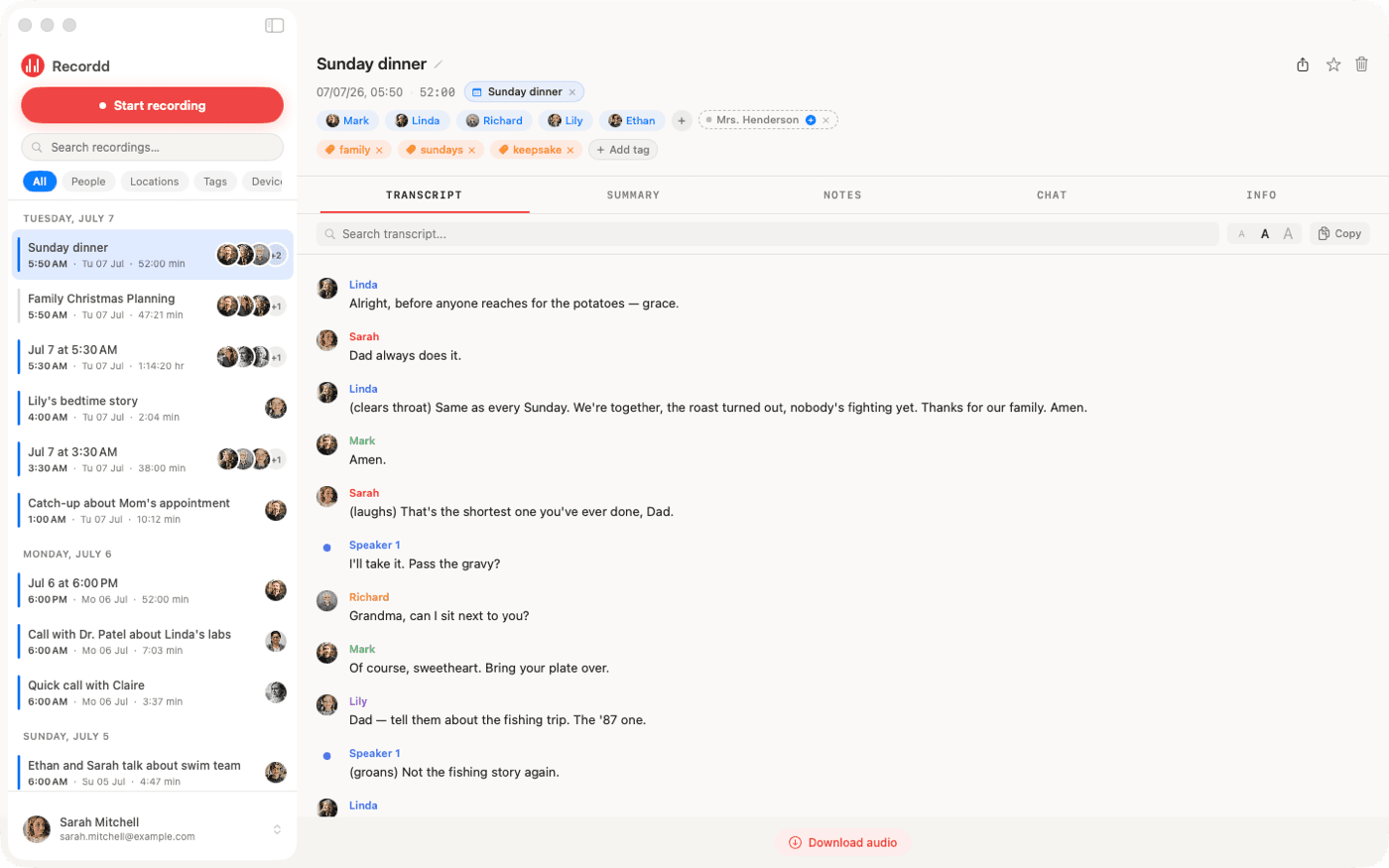
Recordd records your mic and your Mac’s audio as two separate tracks, so calls on FaceTime, Zoom, Meet, Teams, or WhatsApp arrive with each side cleanly labeled, and you tagged as you. Transcripts, summaries, and chat, in the same library as your iPhone. Free to start, no credit card.
macOS 14 Sonoma or later · Apple Silicon & Intel · Notarized by Apple, updates itself · Free plan, 40 minutes, no credit card
Never trains on your data26 languagesNo bot in your calls
Also on iPhone, iPad, and Apple Watch. One library, one subscription.


No bot
Nothing joins your call. It's your Mac's own audio.
Two tracks
Your mic and the room, recorded separately.
Crash-proof
Written in segments. Recovered on relaunch.
The Mac difference
Record any call.
Without a bot in the room.
Recordd captures your microphone and whatever your Mac is playing, at the same time, as two separate tracks. Nothing joins the meeting and nobody gets a “Recordd has entered” notice. Telling people you’re recording is on you, and in many places the law requires it.
Bot-based note takers
- A bot joins the call as a visible participant
- Scheduled meetings only, pulled from your calendar
- One mixed track, so who said what is guesswork
- Needs a live connection to work at all
Recordd for Mac
- Nothing joins. Recordd records what your Mac plays
- Anything with sound: a call, a lecture, a voicemail, a talk
- Two tracks, so your voice is tagged as you, every time
- Records offline, transcribes when you're back online
Built for the Mac
Everything Recordd does on your phone,
on the machine you work on.
Dual-track capture
Your mic on one track, your Mac's audio on the other, through Apple's own ScreenCaptureKit. No virtual audio driver, no cable, no setup beyond one permission.
⌘R and you're recording
Pick your mic, system audio, or both. Recordd follows your default input, so swapping from AirPods to the built-in mic mid-call just works.
You, labeled as you
Because your voice has its own track, Recordd tags you as “me” and tells the other speakers apart by voice. Name someone once and they're named everywhere.
Survives a crash
Audio is written to disk in short segments as you go. If your Mac sleeps, crashes, or you force-quit, the recording is recovered the next time Recordd opens.
Calendar-aware
Grant calendar access and Recordd suggests who was in the room from the meeting invite. Names, not “Speaker 2”.
Summaries and chat
Every processed recording gets a title, a summary, and action items. Ask it anything and jump to the moment it was said.
How it works
Three steps. Zero setup.
Press record.
⌘R. Choose your mic, system audio, or both. Recording keeps going in the background while you work.
Press process.
One click when you're done. Transcript, speakers, summary, in the language you choose. Or just save the audio and decide later.
It's everywhere.
The recording lands in your library on iPhone, iPad, and Apple Watch too. Search it, chat with it, export it as text or Markdown.
Use it for
Made for every kind of recording.
Video calls
FaceTime, Zoom, Google Meet, Microsoft Teams, Slack huddles, WhatsApp. Any app that plays sound on your Mac.
Calls you take on your Mac
iPhone calls answered on your Mac come through its speakers, so they're recorded like everything else.
Lectures and webinars
A livestream, a recorded class, a conference talk. Record it, then search the transcript instead of rewatching.
Interviews and podcasts
Two clean tracks make quoting easy, and every speaker is labeled by voice.
Voice memos at your desk
Talk an idea through with the mic only. It's transcribed, titled, and searchable like the rest.
Anything your Mac plays
A voicemail, a voice message, a video you want to quote. If you can hear it, Recordd can keep it.
Requirements
Made for the Mac.
- macOS
- 14 Sonoma or later
- Chip
- Apple Silicon and Intel, one universal app
- Install
- Direct download with automatic updates. Mac App Store version coming
- Subscription
- One plan covers Mac, iPhone, iPad, and Apple Watch
- Permissions
- Microphone, plus Screen & System Audio Recording for the other side of a call. Recordd never accesses video or screen contents
- Size
- About 26 MB
Pricing
Simple, honest pricing.
Free to start. Upgrade when you're ready. Every plan lives inside the app.
Annual
$99.99 billed once a year · 3-day free trial
Subscribe from the app · cancel anytime
Weekly
Cancel anytime · no trial
One subscription · iPhone, iPad, Mac & Watch
Both Pro plans include
- ✓Unlimited recording time
- ✓Unlimited transcripts, summaries, and chat
- ✓Speaker-labeled transcripts with timestamps
- ✓Export transcripts (MD, TXT)
- ✓Location tagging (optional)
- ✓Calendar-aware people suggestions
- ✓iPhone, iPad, Mac and Apple Watch, same library
- ✓Private by default, never used to train AI
Free: 40 minutes on the house. Every feature unlocked, no credit card, try it end-to-end.
Questions
Mac questions.
Does Recordd for Mac need a bot to record meetings?+
No. Recordd records your microphone and your Mac's own audio output, so it works with any call without anything joining the meeting. There's no participant named Recordd and no notification to the other side.
Which apps does it work with?+
Any app that plays audio through your Mac: FaceTime, Zoom, Google Meet, Microsoft Teams, Slack, WhatsApp, Discord, and anything playing in Safari or Chrome. If you can hear it, Recordd can record it.
Do I need a virtual audio driver like BlackHole or Loopback?+
No. Recordd uses the system audio capture built into macOS. You grant one permission, Screen & System Audio Recording, and that's the whole setup. Recordd never sees your screen or video, only the audio.
Is it really free?+
Yes. The free plan is the whole app with 40 minutes of recording, lifetime. Recordd Pro removes the cap for $6.99 a week or $99.99 a year, with a 3-day free trial on the yearly plan.
Will my audio be used to train AI?+
No. Transcription runs on our servers and nothing is used to train any model, ours or a third party's. You can delete any recording, or your whole account, at any time.
What happens if my Mac crashes mid-recording?+
Recordd writes audio to disk in short segments while you record. If your Mac crashes, sleeps, or you force-quit, the recording is recovered and finished the next time you open the app.
Does it work with the iPhone app?+
Yes. It's one library. A call recorded on your Mac shows up on your iPhone, iPad, and Apple Watch, and a voice memo from your wrist shows up on your Mac. One subscription covers all of them.
Direct download or Mac App Store?+
Today, direct download. It's notarized by Apple and updates itself. The Mac App Store version is in review; when it's live, either one will work with the same library and subscription.
Download
Get Recordd.
40 minutes free. Every feature unlocked. Takes 30 seconds to set up, and your library compounds from minute one.
40 minutes free, forever · every feature included · try Pro free, cancel anytime