Plaud Note alternative: an AI voice recorder app instead of a device
The recorder you already carry.
Most people searching for a Plaud Note alternative like the idea and not the object. Plaud Note is a thin card that snaps to the back of your iPhone with a MagSafe-compatible case, records for hours on its own battery, and captures phone calls through a vibration sensor that reads the phone's speaker. It is a well-made device. It is also one more thing to charge, carry, and sync before you can read a transcript.
Recordd does the same job in software on the iPhone, iPad, Mac, and Apple Watch you already own. On Mac it records both sides of a call as two separate tracks with no bot and no virtual driver. On every device it writes audio to disk in short segments while you record and uploads as it goes, so a crash, a force-quit, or a dead battery never costs you the conversation.
40 minutes free, forever · every feature included · try Pro free, cancel anytime
Plaud Note vs Recordd, feature by feature
Side by side.
| Plaud Note | Recordd | |
|---|---|---|
| What you carry | A separate card or pin. Plaud Note is 0.12 inches thin, records up to 30 hours on a charge, and holds audio on the device until it syncs to the app | Nothing extra. The iPhone in your pocket, the Watch on your wrist, ⌘R on the Mac |
| Phone calls on iPhone | Yes. In phone-call mode the card reads the phone speaker's vibrations, so both sides are captured. Headphones can't be used during the call | No. Apple lets only its own Phone app record cellular calls. An incoming call pauses your recording and resumes it afterwards |
| Calls on Mac: FaceTime, Zoom, Meet, Teams | In-person mode records what the microphones hear in the room, including your Mac's speakers | Mic and system audio as two clean tracks through Apple's ScreenCaptureKit. Your voice is tagged “me”; echo cancellation and ducking keep it off the other track |
| From stop to transcript | Record on the card, sync to the Plaud app, then transcribe against your monthly minutes | Stop, tap Process. Or save without transcribing. The segments already uploaded while you were recording |
| If something goes wrong mid-recording | Audio stays in the device's local storage until it syncs | Audio hits disk in short segments and uploads as you go. After a crash, force-quit, or sleep, the recording is recovered and finished on next launch |
| Who said what | Speaker labels in the transcript | Speaker separation on Recordd's own model. Name someone once and their voice is recognized in other recordings |
| Transcription languages | 112 and up | 26 languages plus auto-detect |
| Summaries and questions | Thousands of summary templates, Ask Plaud, a choice of AI models | AI title, summary, action items, and chat with a recording that jumps to the moment it was said |
| Where you read it | Plaud app on iOS and Android, Plaud Web, Plaud Desktop | iPhone, iPad, Mac, and Apple Watch, one synced library. No Android, Windows, or web app |
| Integrations and export | Slack, Notion, Google Drive, Zapier, and Google Calendar on paid plans | Export Markdown or plain text with speaker labels; copy; Mac reveals the audio file. No integrations |
| What it costs | The hardware, plus a plan: 300 free transcription minutes a month, with Pro and Unlimited subscriptions above that | No hardware. Free is the whole app with a 40-minute lifetime cap. Pro $6.99/week or $99.99/year, one subscription for every device |
Plaud Note details checked 2026-09-23 on their site. Products change; tell us if something is out of date.
Why switch from Plaud Note to Recordd
What you get to keep.
Nothing between you and the recording
No card to charge, no pin to find, no sync step. Tap the Watch, open the iPhone, or press ⌘R on the Mac. Recording runs in the background with the phone locked, pauses for an incoming call, and picks up again after.
Two tracks on Mac, your voice tagged “me”
Recordd captures your microphone and the other side of the call separately, with no bot in the meeting and no virtual audio driver. Echo cancellation and mic ducking keep your voice off their track. If you switch to AirPods mid-call, it follows.
Saved as you go
Short segments hit disk while you record and upload in the background. Airplane mode is fine; transcription waits for a connection. Crash, force-quit, or sleep, and the recording is recovered and finished on next launch, then synced to every device.
When Plaud Note is the better choice
Buy Plaud if you need to record cellular phone calls on your iPhone; its vibration sensor does what no iPhone app is allowed to. Choose it too if you want a device that records for many hours on its own battery without touching your phone, a pin you can wear and forget, a language outside Recordd's 26, or an Android or web app. Recordd is the better fit when you would rather not carry a second device, when your calls happen on a Mac, and when you want a library that is searchable on every Apple device you own.
The voice recorder app on iPhone and Mac
This is the whole thing,
actually running.
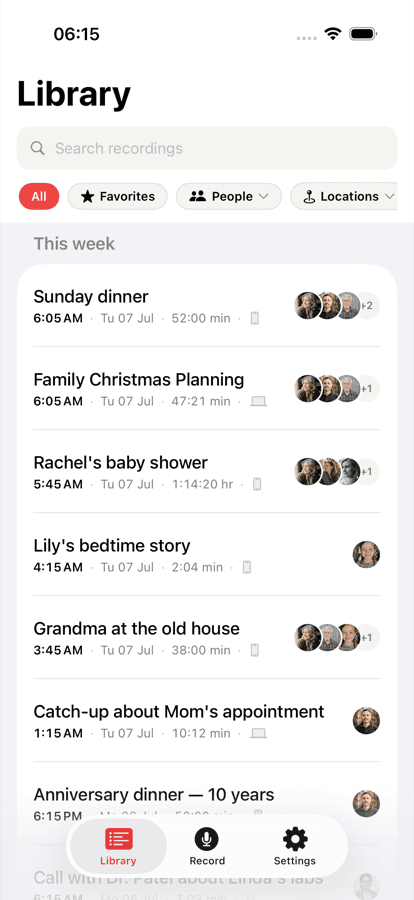
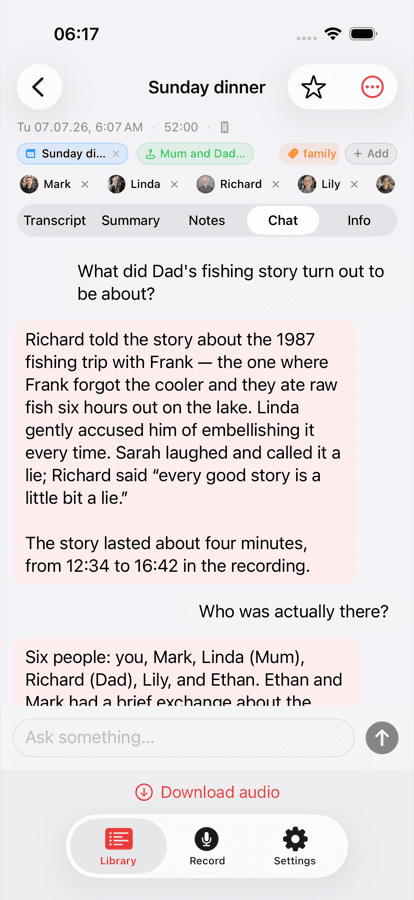
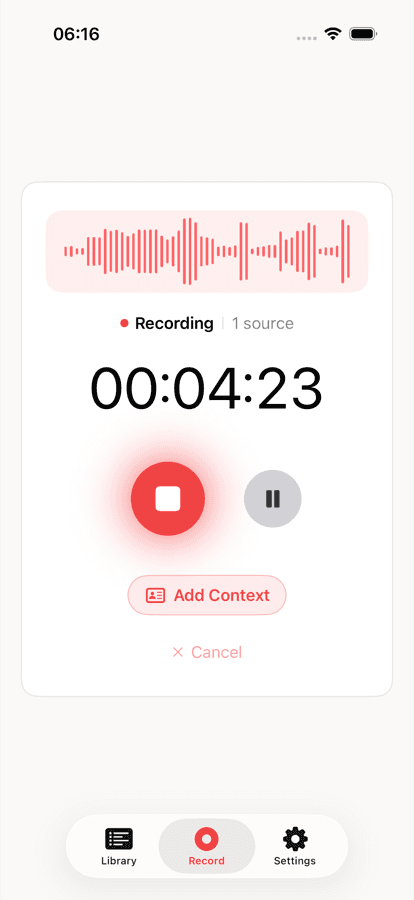
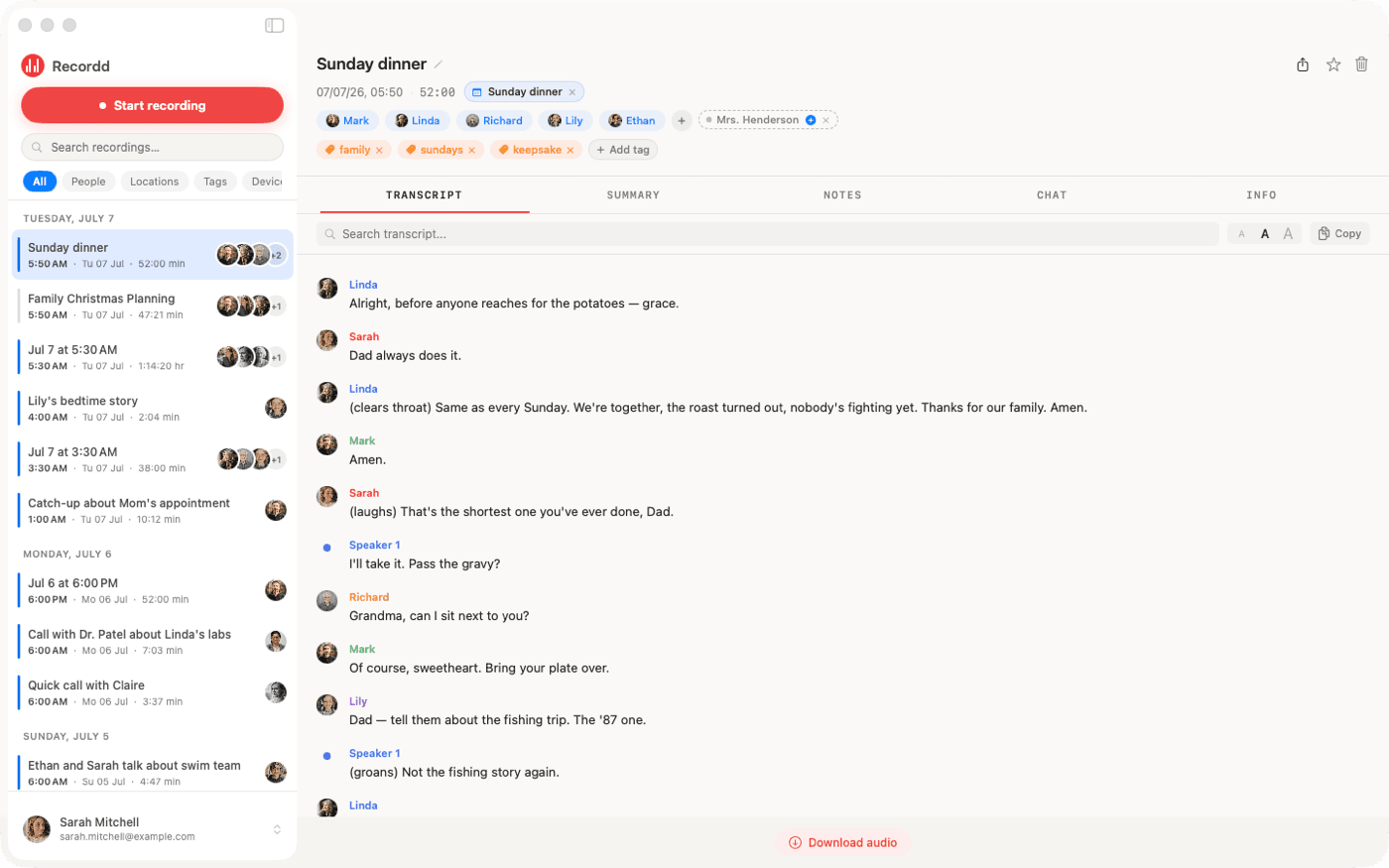
Your library on iPhone, ask-anything chat on any recording, and the full desktop transcript on Mac. Same library, everywhere.
Plaud Note vs Recordd questions
Before you switch.
Can Recordd record phone calls like Plaud Note?+
Not cellular calls on iPhone. Apple only lets its own Phone app do that, and Plaud gets around it with hardware that reads the phone speaker's vibrations. On Mac, Recordd records both sides of FaceTime, Zoom, Google Meet, Microsoft Teams, Slack, WhatsApp, and Discord calls as two separate tracks. On iPhone, an incoming call pauses your recording and it resumes afterwards.
Do I need to buy anything?+
No. Recordd runs on iPhone, iPad, Mac, and Apple Watch. The free plan is the whole app with 40 minutes of recording, forever. Pro is $6.99 a week or $99.99 a year, with a free trial on the yearly plan.
Can Recordd record with the phone in my pocket?+
Yes. Recording runs in the background with the screen locked, and you can pause and resume. On Apple Watch it is one tap; the clip transfers to your iPhone and goes through the same pipeline. Recording also works fully offline, including in airplane mode.
What happens if my phone dies or the app crashes while recording?+
The audio is written to disk in short segments as you record, and the segments already captured have uploaded. On next launch, Recordd recovers the recording and finishes it. Nothing depends on a live connection during the recording.
How many languages does Recordd transcribe?+
26, with automatic detection. Plaud lists more than a hundred, so if yours is not among Recordd's 26, Plaud is the better choice. Recordd's interface is available in 28 languages.
Is my audio private?+
Your recordings are encrypted in transit and at rest and are never used to train AI, ours or anyone else's. Location is optional and off by default. Delete a recording or your whole account any time.
Download the voice recorder app for iPhone and Mac
Get Recordd.
40 minutes free. Every feature unlocked. Takes 30 seconds to set up, and your library compounds from minute one.
40 minutes free, forever · every feature included · try Pro free, cancel anytime